Showing posts with label student self-reflection. Show all posts

Monday, January 21, 2019

Experience Points for Student Goal Setting


A couple of days ago, I posted about using forms and sheets for student reflections. As I was pushing it out to students, I started thinking about how to make it easy for me to assign XP and leveled badges for its use. Ideally, I would have some sort of automation that:

1. Allowed me to see students' latest goal without having to open each individual spreadsheet, and
2. Assigned XP and badges automatically.

Students latest goals:


I created a new spreadsheet, copy pasted my roster in column A, and used the importrange formula to bring the timestamp and goal from each individual grade reflection Goal sheet. For example:

=IMPORTRANGE("https://docs.google.com/spreadsheets/d/180ZOz9vkPq20ZDKy3KJUN--gVpWP6TABFKzk-hSxW5Q/edit#gid=168726689", "Goals!$A$3:$B$3")

Where:

  •  https://docs.google.com/spreadsheets/d/180ZOz9vkPq20ZDKy3KJUN--gVpWP6TABFKzk-hSxW5Q/edit#gid=168726689" is the URL of the individual grade sheet
  • Goals is the name of the sheet I am bringing over
  • $A$3:$B$3 is the cell reference for time stamp and goal

Painstaking in that you do have to change each cell reference, but you only have to do this during set up. It is worth noting that when you do this the first time, you will probably get an error telling you that you need to grant permission. Just click on the cell and allow access. Also note that the sorting by timestamp was already done in their individual sheets as explained under Form Responses 2 in my previous post.

Automatically assign XP for goals

This portion of the post assumes that you are already using spreadsheets to house your leaderboard, and works with any version you may have created. If you are looking for one, I offer mine, Mr. Matera's or Mr. Powley's.

As we all know, the faster XP are show/given out, the better. This posed a problem for the assigning of XP for this activity since nothing would replace the student/teacher conferencing about their goals or the student actually reflecting on them. However, I figured that if I could at least give out points and badges for some measure of completion, I could always go back and make time for those conversations. As I toyed with how to do this, I thought about making sure that some specific words were included, but quickly gave up on that simply because my list of possibilities grew rather quickly. I settled instead for a simple word count and figured that 30 words at a minimum per goal are sufficient. Letting Google spreadsheets do the work for me, I added a hidden spreadsheet to the grade reflection spreadsheet template I shared before. When you make your own copy of that document, simply unhide it


As displayed when unhidden, this sheet is simply the place where the counting and calculation of XP happens and can be modified to suit your needs.


With that in place, it is back to the leaderboard page, where you would need to decide where you would like to maintain the information and when to assign badges. 

The formula used to bring the XP from the student grade reflection sheet to the corresponding cell in your leaderboard is:

=IMPORTRANGE("https://docs.google.com/spreadsheets/d/180ZOz9vkPq20ZDKy3KJUN--gVpWP6TABFKzk-hSxW5Q/edit#gid=168726689", "Wordcount!C2")

As before, each spreadsheet reference is unique to the student grade reflection sheet, so it needs to be manually changed and the spreadsheets need to be linked.


Finally, the awarding of badges is done using the techniques described in my Leaderboard and Badges post, using a conditional formula that awards badges according to the total points accumulated from the word count.

And the badges are displayed on the individual student sheets which feed from the leaderboard as explained in this post.

In an ideal world, the badges would only be assigned if the student actually met the goal they set for themselves, but that is a conundrum that I have yet to solve. Perhaps you have some ideas?

Friday, January 18, 2019

Reflective Students with Google Forms and Sheets


It is the end of the semester, and like most teachers, my colleagues and I are currently under the barrage of with last minute regrade requests that should have been taken care of months ago. Like you, we published grades in our LMS as assignments were due, and the students received feedback with full knowledge that their grades are fluid. We have been encouraging them to take action on the feedback, make corrections, additions, etc. We have had individual conferences, sent e-mails, and clarified, but still, some of them are surprised when they finally log on to look at their grades, and the inevitable "What can I do?" question pops up. At this point, the reply is, "Go do what I've been asking you to do all along."

As we pondered this in our last PLC meeting, we figured that one of the issues our students have is that not only are they not looking at our LMS consistently, they are not opening the rubrics and comments left on their assignments. By the same token, they are not thinking about the work habits they are cultivating and forget about any type of goal setting related to their work or performance. The question then became, how can we set up a routine that will allow our students to do all of this consistently.

@judyzaccheo shared her use of Sown to Grow, a platform whose goal is to "Empower students to set goals, reflect on strategies, and learn how to learn.". While it looks awesome and an easy way to address these issues, if you have been here before, you know that:

1. I do not have the funds to pay for stuff like that ( even if it is inexpensive), and 
2. I do not like to use platforms that cannot "move" with the students. (I like to use things that my students can keep using even after they have left my class).

So, I spent the last few days coming up with a solution, and along the way, I learned some things about how to allow anyone to make a copy of a Google form, automatically sort form responses by timestamp so that the latest shows on top, and forgo creating charts within a spreadsheet using a sparkline instead. 

Before we get into the how-to, let me show you the final product.


We start off with a traditional Google form. The form is divided into sections that allow students to input their grades for each subject, discuss what made them successful (or not) in each class, and set a goal for the next week.


This feeds into a spreadsheet that then organizes the information so that the latest goal and information is at the top.  I figured that if we are doing this every week and things populated at the bottom, the students would never scroll down to find the latest entry. This is also why I needed the "Goals" sheet as the landing sheet. They need to see, front and center what they said they were going to do.


Finally the "Content Area" sheets, where students can see their grade trends, and notice when their grade changed, and the work habits that led to those grades.


Hopefully, you are still with me as I share just how to do this. First off, I started with the creation of a Folder with "Anyone with the link can view" permissions that would house both the master spreadsheet and form. This step is important when sharing the forced copy of the form.

Copy of a Google Form. 

In the past, I've shared copies with teachers by simply having them create copies of the spreadsheet linked to it. I tried to do the same with the students, first by making them copies in Google classroom and when that didn't work forcing a copy of a link I sent them. For some reason, this does not work when working with student accounts! Even when the Form button appears, once students click on it ends up creating a blank form. Yup, you guessed it, spent a class period with my pilot class trying to troubleshoot with them and then the bell rang... After some digging that still did not explain why it would not work, I came across Mrs. Drasby's post. Following her instructions, I was able to create a link that would force that copy of the actual form for my students. That was all fine, but now I had to walk my students through recreating the spreadsheet with all that sorting and tabs that I had painstakingly created.

Copy of the Spreadsheet 

While some of my students would jump at the idea of working with the different formulas and conditional formatting that make the spreadsheet work, I know that for many it would end up in frustration and me running around "fixing" it. So instead I created instructions that would allow the students to copy each of the sheets from my master with minimal possibility of error. 


Note, these start off with the copying of the form. Once the students had their personal forms and sheets, it was simply a matter of having them submit their sheets to me in Google classroom so I would have them all for an easy looking into.

How the spreadsheet works

While I have shared my form, spreadsheet and instructions in this folder for you to use "as is", I am under no illusion that it suits your needs perfectly. So a little explanation that would allow you to recreate or modify is in order. I do recommend that when you make your own copies, you house them in a folder with "Anyone with the link can view" permissions to ensure that you do not run into problems when students copy your form. Anyway...

Form Responses 1


This is simply the sheet created by the form. Notice the purple box indicating that it is linked.

Form Responses 2

This sheet sorts the responses from Form Responses 1 in ascending order. The only thing it actually contains is this formula in cell A1.
=sort('Form Responses 1'!A:O, 1,0)
If your form has more or fewer cells than A:O, simply change the cell reference.

Goals sheet
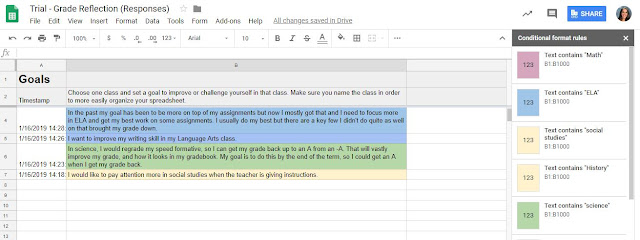

This sheet brings up the responses from the Goals column from the sorted Forms Responses 2, using

=ARRAYFORMULA('Form Responses 2'!A1:A) in cell A2 to bring up the timestamp in column A
=ARRAYFORMULA('Form Responses 2'!O:O) in cell B2 to bring up the goals typed in from column O

Column B has a set of conditional formatting color-coding the responses when they include the content area names. Here the idea was that students can look at how frequently they make a goal for a specific class and reflect on whether they are meeting their goal or not.

Content Area Sheets


Bring up the grades reported for each class to its corresponding sheet along with the "what made you successful or not answer. In each, the only thing that changes is the cell references. 

=ARRAYFORMULA('Form Responses 2'!A1:A) in cell A2 to bring up the timestamp in column A
=ARRAYFORMULA('Form Responses 2'!H:I) in cell B2 to bring up the grade and comment, which have adjoining columns, in this case, cells from column H and I. 

Column B in these sheets has conditional formatting as a visual for students to notice when their grades for a class dip or move up and reflect on the habits that took them there.

Finally, these sheets also contain a sparkline formula that creates the added "graph":
I toyed with the idea of adding an actual chart, which you could still do. Since it was really an added visual to show quick trends I opted for a sparkline. The one I used is
=SPARKLINE(B3:B, {"charttype","column"; "axis", true; "axiscolor", "red"}) - Using the information now housed in column B, but you could change it up with any of the other versions found in this support article from Google.

Using this with students

I basically just rolled this out a couple of days ago. The intention is that students will input answers in their forms weekly, during class time, giving them a moment to stop and reflect on how they are doing. I know, from the examples submitted that we definitely have work to do in the goal-setting department, but my hope is that with instruction, consistency, and practice we will finally get rid of those last minute "What can I do to bring my grade up?" requests. I am also thinking that it is a great resource to have at parent conferences and SSTs. It even helps address ISTE standard for students 1a "Students articulate and set personal learning goals, develop strategies leveraging technology to achieve them and reflect on the learning process itself to improve learning outcomes".

What do you think?

Saturday, October 3, 2015

My students are taking ownership of the NGSS - Part 1: The Practices

Image source: http://www.slideshare.net/nashworld/ngss-workshop-2013-2 

In a recent conversation with a group of colleagues, I was surprised to hear comments such as:
"I teach science, this NGSS are just the same content standards I already use",  "I use inquiry all the time; my lessons are already NGSS aligned" and finally "If you are teaching the content, students will grasp the crosscutting concepts. I don't need to teach the connections". This got me thinking about just what the NGSS asks educators to do, and what it means in terms of guiding student learning.

At its most basic, the NGSS tells me:

  • What to teach: Disciplinary Core Ideas
  • How to teach it: Science and Engineering Practices
  • Why I teach it: Cross Cutting Concepts


I teach middle school, and my district has not decided whether they will adopt an integrated or science domain model. However, even if I don't know this yet, I decided that I needed to begin working towards analyzing my lessons to determine whether they are NGSS aligned, and to make the alignment visible so that students can really become immersed in the content. For this, I need a different mindset.

The question then became, "How do I get my students to think like scientists so they can make the connections necessary to apply the cross-cutting concepts?" In my quest to answer this question I asked my students to recognize when they were applying the Science and Engineering practices in my classroom. I provided students with the same yes/no questions I use when I am developing my lessons and gave them sentence frames to compose their answers.

The following examples represent student responses to the same lesson.


The fact that both students identified different practices is not a problem. They just have different perspectives on what they did to develop an understanding of the content. That in itself is a win towards making "thinking like scientists" visible and NGSS alignment

Going back to the original conversation, and specifically the comment "I use inquiry all the time; my lessons are already NGSS aligned", I would say, unless the students are asking the questions and developing their own investigations, the lesson is not NGSS aligned. Inquiry is not equal to NGSS alignment. However, having the students think like scientists as they develop their understanding is a first step.

What do you think?

Friday, June 13, 2014

Beyond "I really liked this project"


Another school year has ended, and as I sit down to ponder what went well and what I would like to change, I once again am stumped by what I can do to improve reflection in my students.  Paolo Freire, in his book Pedagogy of the Oppressed, states that reflection is an essential part of learning and of becoming an agent of change in the world:
"Within the word we find two dimensions, reflection and action, in such radical interaction that if one is sacrificed -- even in part -- the other immediately suffers . . ."

If I am to promote changes in my students' thinking and growth, I need to improve their ability to reflect. So, last summer I read everything I could on the subject and promptly set about attempting to create a classroom where reflection was a big part of our daily and weekly activities, as well as a final requirement for our projects. I made a cutesy chart that was prominently displayed and used.


I made weekly reflective blog posts a requirement, and at the end of every project assigned a reflection, which was graded on a rubric.

My prompt for the reflections went something along the lines of:
"Describe what you learned in completing the assignment, identify what went well and detail what you will improve on for next time."
Most of my students did well with just this; however, even as I tried time and time again to give pointed feedback on the reflections, about 20% of my students seldom went beyond:
"I really liked this project/assignment because I got to work with my friends..."
"Next time, I will stay on task more and not get distracted."

What to do, what to do...

Recently, I came across Edutopia's 40 reflective questions, and I particularly liked how they separated them into categories (Backward-looking, Inward-looking, Outward-looking, Forward-looking). I think that by naming them, the respondent gets into a different mindset as he/she prepares to answer.

As I move forward, I will be modifying them a little bit  to address not only the end products, but the weekly work. I will also ask students to "ACE" their answers, citing examples and non examples, as well as expanding with a "what it looks like or sounds like". Of course, there will be a rubric.


Will it work? I don't know, but I would love to hear your thoughts. How have you improved student reflection in your classroom?


Further reading:


  • Block, Joshua. "Let It Marinate: The Importance of Reflection and Closing."Edutopia. Edutopia, 18 Apr. 2014. Web. 13 June 2014. <http://www.edutopia.org/blog/let-it-marinate-reflection-closing-joshua-block>.
  • Boss, Suzie. "High Tech Reflection Strategies Make Learning Stick." Edutopia. Edutopia, 4 Mar. 2009. Web. 13 June 2014. <http://www.edutopia.org/student-reflection-blogs-journals-technology>.
  • Yoshida, Clyde. "Creating a Culture of Student Reflection: Self-Assessment Yields Positive Results." Edutopia. Edutopia, 1 July 1997. Web. 13 June 2014. <http://www.edutopia.org/creating-culture-student-reflection>.
  • Clements, Mark. "Using Reflection to Help Students Learn." Edunators. N.p., n.d. Web. 13 June 2014. <http://www.edunators.com/index.php/becoming-the-edunator/step-5-reflecting-for-learning/using-reflection-to-help-students-learn>.